
EventIDE Update: Meet AI LabMate, Smarter Scripting, Deeper EEG Integration, and More

We’re excited to introduce a major new update to EventIDE—focused on what matters most to researchers: faster experiment design, deeper hardware integration, smarter adaptive procedures, and more powerful signal processing tools.
Introducing LabMate (Beta): Your Integrated AI Research Assistant

We’re introducing LabMate—a new AI assistant built directly into EventIDE.
LabMate is currently released as a beta feature, and we see it as the beginning of a new, smarter way to design and configure experiments. While it already provides powerful support, we are actively refining and expanding its capabilities based on user feedback.
Unlike a generic chatbot, LabMate is context-aware. It understands your experiment structure, elements, configuration, and scripting environment—so the assistance it provides is directly relevant to what you’re building.
What LabMate can help you with:
Experiment design & configuration
Choosing appropriate elements
Structuring flow routes
Configuring timing and parameters
Research hardware setup
Guidance on EEG and signal acquisition setups
Help configuring AddIns and device connections
Scripting assistance
Support for C#, VB, and XAML
Help debugging and refining logic
Parameter tuning suggestions
Integrated knowledge base + contextual web search
Direct access to documentation
Context-aware answers grounded in EventIDE features
AI + Human Support, When You Need It

Because LabMate is in beta, there may be situations where its answers are incomplete or not fully aligned with your specific setup. In those cases, you can request direct human assistance directly from within LabMate.
If you’re not satisfied with an AI-generated response, simply escalate the question—our team can step in and provide expert guidance tailored to your experiment.
This hybrid approach combines:
The speed and availability of AI
The expertise and nuance of human support
We’re excited to evolve LabMate together with our research community. Your feedback will directly shape its development and help us make it an indispensable assistant for experimental science.
Deep Learning–Based Tracking with Built-In Face Tracking
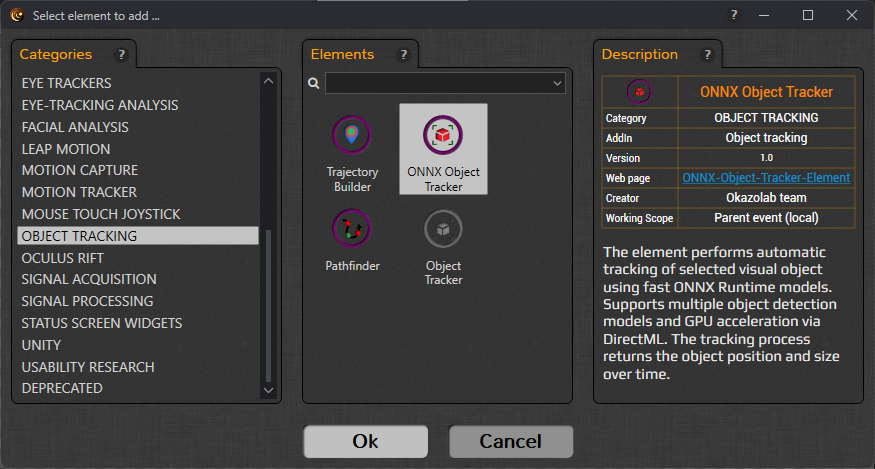
The Object Tracking AddIn now includes the new ONNX Object Tracker element—bringing deep learning–based object detection directly into EventIDE experiments, with a strong focus on real-time face tracking.
The element performs automatic tracking of selected visual objects using fast ONNX Runtime models and returns the object’s position, size, detection confidence, and processing time in real time—making it suitable for adaptive paradigms.
Flexible Tracking Modes
You can choose between:
ONNX model detection (pure neural network inference)
Template matching (using a grabbed visual template)
Hybrid mode (combining ONNX detection with template matching for improved robustness)
Hybrid tracking allows you to balance generalization and stability—particularly useful in dynamic or noisy visual environments.
Key Capabilities
Load custom ONNX models (with XML descriptor)
Select specific target class IDs (e.g., person, car, bird, etc.)
Adjust confidence thresholds to control false positives
Configure detection pace for video-based stimuli
Enable DirectML GPU acceleration for faster inference
Capture templates at runtime (“Grab Template Now”)
Monitor detection confidence and processing time live
Trajectory control options allow you to reset, preview, and save object trajectories recorded during runtime—supporting detailed behavioral or motion analyses.
Designed for Real-Time Face Tracking Experiments
A ready-to-use face-tracking ONNX model is included with the AddIn, allowing you to immediately detect and track faces without additional model preparation. The element continuously returns the detected face’s position, size, detection confidence, and processing time, enabling markerless behavioral tracking, social interaction paradigms, stimulus-contingent adaptation, and advanced real-time experimental control—all within the standard EventIDE workflow.
Adaptive Staircases: Now with QUEST

The Staircase Method element now supports multiple adaptive procedures, including the highly efficient QUEST method.
QUEST is widely used in psychophysics for rapid and statistically efficient threshold estimation. Now you can choose the adaptive strategy that best fits your paradigm—whether you prioritize speed, precision, or simplicity.
This makes EventIDE even more suitable for:
Perceptual threshold estimation
Sensory calibration studies
Adaptive training protocols
Faster Phase Locking & Improved Analysis Pipeline
For researchers working with closed-loop stimulation and oscillatory phase targeting:
The Phase Locker element is optimized for up to 10% faster processing speed.
The outdated Prediction List file has been replaced with a full Session Log file.
The new format is fully compatible with PhInsight, our phase-locking analysis tool.
PhInsight can now export selected results to EDF+, improving interoperability with external analysis pipelines.
Together, these changes streamline the loop from acquisition → stimulation → validation → export.
IQEEG Amplifier Support
We’ve added a new IQEEG AddIn with support for IQEEG amplifiers.
This extends EventIDE’s ecosystem for EEG acquisition and opens new possibilities for labs working with IQEEG hardware. As always, acquisition integrates seamlessly with experiment timing and signal-driven elements.
Modern C# and VB via Roslyn
EventIDE scripting now uses the Roslyn compiler, enabling modern C#/VB syntax support (up to C# 10, depending on configuration).
This means:
Access to modern language features
Cleaner and more expressive scripting
Improved maintainability of complex experiment logic
For labs building advanced paradigms or signal-driven pipelines, this significantly improves scripting flexibility.
GUI & Dashboard Improvements
Dashboard and GUI Panel elements now support custom lists with selection bound to string or integer variables.
The WIDGET category has been renamed to STATUS SCREEN WIDGETS for clarity.
The system idle check on experiment run is now optional (configurable in experiment properties).
These updates make runtime control and experiment monitoring more flexible—especially for multi-user or operator-assisted setups.
Signal Testing Made Easier
The File Signal element can now generate a test oscillatory signal if no input file is provided.
This is especially useful for:
Testing experiment logic
Validating neurofeedback pipelines
Demonstrating algorithms without hardware
Stability and Fixes
This release also includes important reliability improvements:
Fixed crashes in Dashboard variable selection (2D arrays)
Fixed full factorial design crash in Condition List
Fixed multi-monitor runtime window layout issues
Fixed video playback reload issue
Fixed impedance mode SPACE-key toggling in EEG elements
Improved EDF+ header compatibility in Signal File Writer
Numerous Status Screen fixes and stability improvements


Comments